
Today I read a thread at the wxPython user group about someone who was looking for a math equation editor that used Latex formulas: http://groups.google.com/group/wxpython-users/browse_thread/thread/33be14898871c5fa
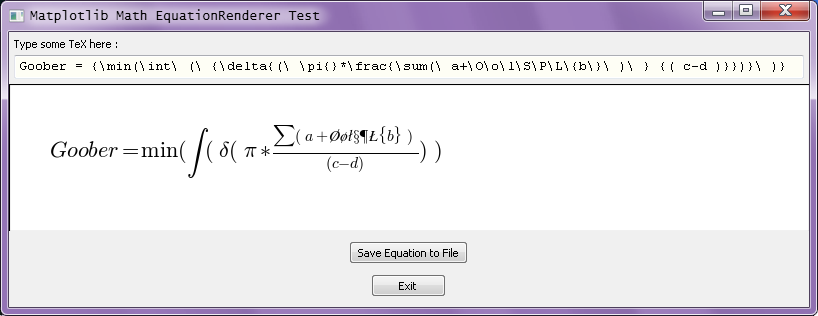
Chris Barker suggested using the Matplotlib package and the Aggdraw_for_wx package. He provided a demo app that rendered and displayed a math equation. I've filled out his code with the abilities to save the rendered image to a PNG file and also to also crop the image to just the minimum that's needed using the PIL (Python Imaging Library) package. I put in the equation some fancy math symbols to show off its output at an arbitrary 300 dpi.
If PIL is not installed on your system then the output image simply won't get cropped. You'll have to do that yourself with any of a multitude of third-party image or graphics editors such as Photoshop, the GIMP or HyperSnap-DX, etc., etc.
I've got to admit that I know nothing about Matplotlib, yet I was able to guess how to create some common symbols. I suppose that if I actually read its manual I'd figure out how to draw all the Greek and special math symbols. But, no matter. Here's the demo code:
   1 #!/usr/bin/env python
   2
   3 """
   4 Test of embedding matplotlib, and using it to render a mathematical equation.
   5
   6 Original demo by Chris Barker   2010-12-15
   7 Ergonomic, cropping and file saving additions by Ray Pasco     2010-12-15
   8
   9 Tested using :
  10
  11 Windows   6.1.7600   [ Win7 64-bit running on an AMD CPU ]
  12 Python    2.6.5 (r265:79096, Mar 19 2010, 21:48:26) [MSC v.1500 32 bit (Intel)]
  13 Wx         2.8.11.0
  14 Matplotlib 1.0.0
  15 PIL        1.1.7
  16 """
  17
  18 import time
  19
  20 import wx
  21
  22 # These imports take an incredibly long time. [ ~1.8 seconds ]
  23 # Let the user know this is normal and expected.
  24 print '\n----  Importing Matplotlib and Related Modules...'
  25 start = time.clock() # measure the import time
  26 #
  27 import matplotlib
  28 matplotlib.use( 'WXAgg' )   # AggDraw for wxPython.
  29 import matplotlib.figure
  30 import matplotlib.backends.backend_wxagg
  31 #
  32 end = time.clock()
  33 print '      Import Time =', end-start, 'seconds'
  34
  35 #------------------------------------------------------------------------------
  36
  37 class MathPanel( wx.Panel ) :
  38     """
  39     The MathPanel is a very simple panel with just and MPL figure on it,
  40     it will automatically render text in the middle of the figure
  41     """
  42
  43     def __init__( self, parent ) :
  44
  45         wx.Panel.__init__( self, parent=parent, size=(500, 200) )
  46
  47         #-----
  48
  49         # initialize matplotlib stuff.
  50         #
  51         # To make all new figure backgrounds be initialized to white
  52         # edit the file [ \Lib\site-packages\matplotlib\mpl-data\matplotlibrc ]
  53         # Find line [ figure.facecolor : 0.75 ] in section [ ### FIGURE ] and change it to
  54         # [ figure.facecolor : 1.00 ]. Who would want a gray background color by default !?
  55         #
  56         # Create the "figure" and set its background color to white.
  57         self.figure = matplotlib.figure.Figure( None, facecolor='white' )
  58         self.canvas = matplotlib.backends.backend_wxagg.FigureCanvasWxAgg(  \
  59                           self, -1, self.figure )
  60
  61         self._SetSize()
  62         self.Bind( wx.EVT_SIZE, self._SetSize )
  63
  64         self.TeX = ''
  65         self.font_size = 20
  66         self.RenderEquation()
  67
  68     #end __init__
  69
  70     #----------------------------------
  71
  72     def SetTeX( self, str ) :
  73
  74         self.TeX = '$%s$' % (str)
  75         self.RenderEquation()
  76
  77     #----------------------------------
  78
  79     def RenderEquation( self ) :
  80
  81         self.renderError = False        # Can save to file only if False
  82
  83         try :
  84             self.figure.clear()
  85             self.figure.text( 0.05, 0.5, self.TeX, size=self.font_size )
  86             self.canvas.draw()
  87
  88         except matplotlib.pyparsing.ParseFatalException :
  89
  90             self.renderError = True     # Don't save the Tex error message to a file !
  91             self.figure.clear()
  92             self.figure.text( 0.05, 0.5, 'Parsing Error in MathTeX', size=self.font_size )
  93             self.canvas.draw()
  94
  95         #end try
  96
  97     #end def
  98
  99     #----------------------------------
 100
 101     def _SetSize( self, evt=None ) :
 102
 103         pixels = self.GetSize()
 104         self.SetSize( pixels )
 105         self.canvas.SetSize( pixels )
 106
 107         dpi = self.figure.get_dpi()
 108         self.figure.set_size_inches( float( pixels[0] ) / dpi,
 109                                      float( pixels[1] ) / dpi )
 110     #end def
 111
 112 #------------------------------------------------------------------------------
 113
 114 class MathFrame( wx.Frame ) :
 115
 116     def __init__( self ) :
 117
 118         wx.Frame.__init__( self, None, -1, pos=(10, 10),
 119                            title='Matplotlib Math EquationRenderer Test'  )
 120         self.ClientSize = (800, 275)
 121
 122         # Frames need an initial panel to provide tab traversal and
 123         # cross-platform background color capabilities.
 124         frmPanel = wx.Panel( self )
 125
 126         #-----
 127
 128         self.math_panel = MathPanel( frmPanel )
 129
 130         self.input_box = wx.TextCtrl( frmPanel, size=(500, -1) )
 131         self.input_box.Font = wx.Font( 10,
 132                                        wx.FONTFAMILY_TELETYPE,
 133                                        wx.FONTSTYLE_NORMAL,
 134                                        wx.FONTWEIGHT_NORMAL )
 135         self.input_box.Bind( wx.EVT_TEXT, self.OnText )
 136
 137         # Set a default equation. Show some fancy math symbols.
 138         equation = r'Goober = {\min(\int\ (\ {\delta{(\ \pi{}*\frac{\sum(\ a+\O\o\l\S\P\L\{b\}\ )\ } {( c-d )}})}\ )}'
 139         self.input_box.Value = equation
 140
 141         label_stTxt = wx.StaticText( frmPanel, label='Type some TeX here :' )
 142
 143         saveBtn = wx.Button( frmPanel, label='Save Equation to File' )
 144         saveBtn.Bind( wx.EVT_LEFT_DOWN, self.OnSaveToFileBtn )
 145
 146         exitBtn = wx.Button( frmPanel, label='Exit' )
 147         exitBtn.Bind( wx.EVT_LEFT_DOWN, self.OnExit )
 148
 149         #-----  Layout
 150
 151         frmPnl_vertSzr = wx.BoxSizer( wx.VERTICAL )
 152
 153         frmPnl_vertSzr.Add( label_stTxt,     proportion=0, flag=wx.TOP|wx.LEFT, border=5 )
 154         frmPnl_vertSzr.Add( self.input_box,  proportion=0, flag=wx.GROW|wx.ALL, border=5 )
 155         frmPnl_vertSzr.Add( self.math_panel, proportion=1, flag=wx.GROW )
 156         frmPnl_vertSzr.Add( saveBtn, proportion=0,
 157                             flag=wx.ALIGN_CENTER|wx.BOTTOM|wx.TOP, border=10 )
 158         frmPnl_vertSzr.Add( exitBtn, proportion=0,
 159                             flag=wx.ALIGN_CENTER|wx.BOTTOM,        border=10 )
 160
 161         frmPanel.SetSizerAndFit( frmPnl_vertSzr )
 162
 163     #end __init__
 164
 165     #----------------------------------
 166
 167     def OnText( self, evt ) :
 168
 169         self.math_panel.SetTeX( self.input_box.Value )
 170
 171     #----------------------------------
 172
 173     def OnExit( self, evt ) :
 174
 175         self.Close()
 176
 177     #----------------------------------
 178
 179     def OnSaveToFileBtn( self, event ) :
 180
 181         if not self.math_panel.renderError :
 182
 183             filename = 'Rendered_Equation.png'
 184             self.math_panel.figure.savefig( filename, dpi=300 )
 185             print '\n----  Equation Graphic Saved to File [ %s ]' % filename
 186
 187             # See if the PIL package is installed.
 188             pilIsInstalled = True
 189             try :
 190                 # Try to crop the image to its near-minimum extent.
 191                 import Image        # PIL (Python Image Library)
 192                 import ImageChops   # Image Channel Operations library
 193                 import ImageStat    # Image Statistics library
 194                 import ImageOps     # Various whole image operations.
 195
 196             except :
 197                 pilIsInstalled = False   # Image will not get auto-cropped.
 198             #end try
 199
 200             if pilIsInstalled :      # Auto-crop the image.
 201                 pilImg = Image.open( filename )
 202
 203                 # Find the ordinates of the minimally enclosing bounding box.
 204                 #
 205                 # Create a simplified and inverted version of the original image to examine.
 206                 invertedImage = ImageChops.invert( pilImg.convert( 'L' ) )   # BG must be black to examine.
 207
 208                 # Get the bounding box's ordinates. Works on any image with a black background.
 209                 box = invertedImage.getbbox()                 pilImg = pilImg.crop( box )
 210
 211                 # Add back a thin border padding. This is arbitrary, but seems reasonable.
 212                 pilImg = ImageOps.expand( pilImg, border=10, fill=(255, 255, 255) )
 213
 214                 # Save the image to a disk file. Only PNG and TIFF formats are non-destructive.
 215                 pilImg.save( filename )
 216                 print '      Cropped Equation Graphic Saved'
 217
 218             #end if
 219
 220         else :
 221             print '\n---- Tex Rendering Error:  Figure Image NOT SAVED to a File.'
 222         #end if
 223
 224     #end def
 225
 226 #end MathFrame class
 227
 228 #==============================================================================
 229
 230 if __name__ == '__main__' :
 231
 232     # What packages are installed ?
 233     import os, sys, platform
 234     print
 235     if os.name == 'nt' :
 236         print 'Windows  ', platform.win32_ver()[1]
 237     else :
 238         print 'Platform ', platform.system()
 239     #end if
 240     print 'Python   ', sys.version
 241
 242     addon_pkgs = [ ('Wx        ', 'wx.VERSION_STRING'),
 243                    ('Matplotlib', 'matplotlib.__version__'), ]
 244
 245     try :
 246         import Image        # Doesn't need to be installed.
 247         pilStr = 'PIL       '
 248         pilAddonStr = 'Image.VERSION'
 249         addon_pkgs.append( (pilStr      , pilAddonStr) )
 250     except :
 251         pass
 252     #end try
 253
 254     for addonStr, attribute in addon_pkgs :
 255         try :
 256             print addonStr, eval( attribute )
 257         except NameError :
 258             print
 259         #end try
 260     #end for
 261     print
 262
 263     #----
 264
 265     app = wx.App( redirect=False )
 266     appFrame = MathFrame().Show()
 267     app.MainLoop()
 268
 269 #end if
Here is the file graphic reduced in size by a factor of 3 :
