|
Size: 606
Comment:
|
← Revision 6 as of 2008-03-11 10:50:18 ⇥
Size: 614
Comment: converted to 1.6 markup
|
| Deletions are marked like this. | Additions are marked like this. |
| Line 1: | Line 1: |
| [http://www.sysinternals.com/ntw2k/freeware/debugview.shtml DebugView] is a wonderful tool for viewing real time logging information generated by your applications. You can set filters which will colorize the output according to various rules. But the dialog for setting those filters is awful, especially now when it supports 20 filters. So I developed this little application using the wxPython GUI toolkit to make it easier for me to change the filters. | [[http://www.sysinternals.com/ntw2k/freeware/debugview.shtml|DebugView]] is a wonderful tool for viewing real time logging information generated by your applications. You can set filters which will colorize the output according to various rules. But the dialog for setting those filters is awful, especially now when it supports 20 filters. So I developed this little application using the wxPython GUI toolkit to make it easier for me to change the filters. |
| Line 3: | Line 3: |
| You can download the latest version from [http://adal.chiriliuc.com/debugview_filter_editor.php here]. | You can download the latest version from [[http://adal.chiriliuc.com/debugview_filter_editor.php|here]]. |
| Line 5: | Line 5: |
| attachment:debugview_filter_editor.png | {{attachment:debugview_filter_editor.png}} |
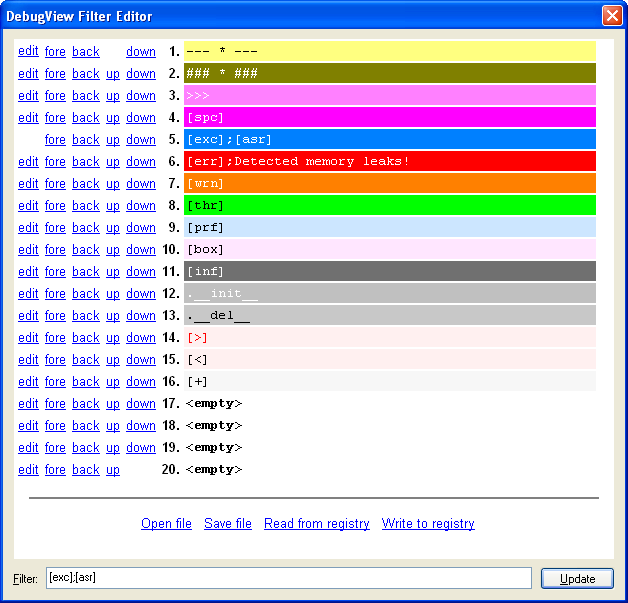
DebugView is a wonderful tool for viewing real time logging information generated by your applications. You can set filters which will colorize the output according to various rules. But the dialog for setting those filters is awful, especially now when it supports 20 filters. So I developed this little application using the wxPython GUI toolkit to make it easier for me to change the filters.
You can download the latest version from here.