
|
Size: 4546
Comment:
|
← Revision 20 as of 2008-03-11 10:50:28 ⇥
Size: 4562
Comment: converted to 1.6 markup
|
| Deletions are marked like this. | Additions are marked like this. |
| Line 8: | Line 8: |
| '''Motivation:''' Sizers are ubiquitous to wxPython layout, especially development tools such as ["wxGlade"] and ["wxDesigner"]. | '''Motivation:''' Sizers are ubiquitous to wxPython layout, especially development tools such as [[wxGlade]] and [[wxDesigner]]. |
| Line 12: | Line 12: |
| * [http://www.wxwidgets.org/manuals/stable/wx_sizeroverview.html Sizer Overview (wxWidgets manual)] | * [[http://www.wxwidgets.org/manuals/stable/wx_sizeroverview.html|Sizer Overview (wxWidgets manual)]] |
| Line 15: | Line 15: |
| * 2.4.1 wxWindows version of ["wxFlexGridSizer"] - no proportionate growable columns. | * 2.4.1 wxWindows version of [[wxFlexGridSizer]] - no proportionate growable columns. |
| Line 19: | Line 19: |
| [[Anchor(Challenge)]] | <<Anchor(Challenge)>> |
| Line 36: | Line 36: |
| attachment:page1.png | {{attachment:page1.png}} |
| Line 52: | Line 52: |
| * Fill this row with a sub-box- a ["wxStaticBoxSizer"]. | * Fill this row with a sub-box- a [[wxStaticBoxSizer]]. |
| Line 66: | Line 66: |
| [#Challenge Remember:] | [[#Challenge|Remember:]] |
| Line 72: | Line 72: |
| This page features a single ["wxGridSizer"]. | This page features a single [[wxGridSizer]]. |
| Line 74: | Line 74: |
| attachment:page2-2.png | {{attachment:page2-2.png}} |
| Line 96: | Line 96: |
| This page features a single ["wxFlexGridSizer"]. | This page features a single [[wxFlexGridSizer]]. |
| Line 98: | Line 98: |
| attachment:page3.png | {{attachment:page3.png}} |
| Line 138: | Line 138: |
| -- LionKimbro [[DateTime(2003-08-15T00:50:36)]] | -- LionKimbro <<DateTime(2003-08-15T00:50:36)>> |
ChallengeSizers (Capable)
maintainer: LionKimbro (jabber id: LionKimbro@jabber.org)
Abstract: Create a big mess of buttons on sizers.
Motivation: Sizers are ubiquitous to wxPython layout, especially development tools such as wxGlade and wxDesigner.
Resources:
UsingSizers (particuarly, big diagram near bottom of page)
Limitations:
2.4.1 wxWindows version of wxFlexGridSizer - no proportionate growable columns.
- Doesn't show how to use wxADJUST_MINSIZE.
- Details box sizers and static box sizers.
Challenge
Create a frame with a notebook inside.
- 3 Pages.
Use "SetSizeHints" to constrain the frame.
minimum: The best size (GetBestSize()) of page 1.
- maximum: Twice the minimum size.
All buttons respond to a click by telling its size in a dialog (wxMessageBox).
Page 1
Has:
- Four rows, all same size.
Except 2nd, which is 50% taller than the others.
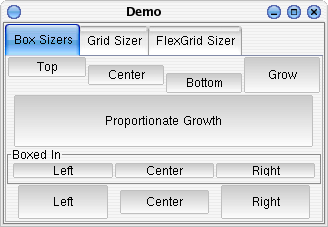
1st Row:
- Holds 4 buttons, equal in width:
#1-#3 do not resize vertically.
- #1 hugs the top.
- #2 floats in the center.
- #3 hugs the bottom.
- #4 occupies as much vertical space as it can.
2nd Row:
- Has 1 button.
The button grows as much as it can, as long as it does so proportionately.
- The button should center horizontally when possible, and lean to the bottom.
3rd Row:
Fill this row with a sub-box- a wxStaticBoxSizer.
- Text should read: "Boxed In".
UsingSizers has a hint on using static box sizers.
- pack three boxes in: "Left", "Center", and "Right"
- equal in width
- growing to maximum height.
4th Row:
- Use spacers and borders, to create 3 buttons:
- (10 blanks) button (10 blanks) button (10 blanks).
- The middle button should have a border of 5 ALL around.
- The left and right buttons should have a border of 5 only on both of their sides.
- All bottons should occupy maximum vertical space.
Use the BestSize of page 1 to set the app's window's min/max sizes.
- All buttons should report their size in a dialog box.
Page 2 Framing
This page features a single wxGridSizer.
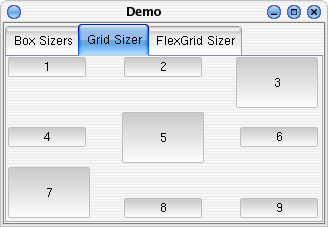
Grid sizers perform only very simple layout. Their limitations can be made up for with nested sizers.
Make a 3x3 grid sizer.
- Horizontal spacing at 30,
- Vertical spacing at 2.
Fill with 9 buttons.
- Hugging their cardinal direction.
- For example, the top left hugs the top and left walls.
- Center button grows to fill allotment.
- Same with bottom-left and top-right.
- Yes, a diagonal stripe from bottom-left to top-right of filling buttons.
Try to make a button that fills horizontally, but not vertically, and vice versa. The layout controls for the grid sizer are not sophisticated. However, you can put a box sizer within a grid sizer cell, and get the behavior you want.
Page 3 Framing
This page features a single wxFlexGridSizer.
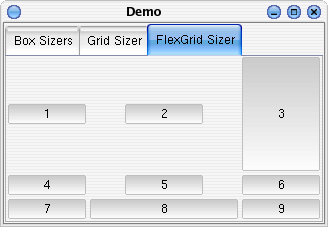
 This challenge assumes wxPython 2.4, which means you can't specify proportionate column/row lengths.
Make a 3x3 flex grid sizer.
- Horizontal spacing at 2,
- Vertical spacing at 2.
- The middle column should grow.
As should the top row.
Fill with 9 buttons.
- Centered.
- Except for the top-right button, and the middle bottom button.
Those two should fill.
Questions to Answer
Congratulations! You're done!
Here's something to ponder:
If:
- you were adding a button to a wxHORIZONTAL sizer,
And:
- button NOT shaped with wxSHAPE,
WHEN?
- ...could you possibly need wxALIGN_CENTER_HORIZONTAL?
consider: proportion=0, proportion>0
- does anything else, besides wxSHAPE adjust width of control (within the sizer's allocation of width)?
- does that thing (that adjusts width of control) leave any ambiguity of horizontal placement?
- thus, is there anything else besides wxSHAPE that could require the use of wxALIGN_CENTER_HORIZONTAL?
Comments
Questions for people who attempted the challenge:
- How long did it take to finish?
- What unreasonable problems did you confront in the challenge?
- How can this be improved?
- Anything else?
-- LionKimbro 2003-08-15 00:50:36